Take a gulp of the
Web with PageGulp!
Here’s a fast and easy way to take a screen shot of any
web page… with a twist.
PageGulp captures most any
Web page you can navigate to.
Most similar
software captures only the live screen area. If the page
requires scrolling, either horizontally
or vertically, you’re out of
luck.
But PageGulp captures the entire page, even a tall or wide one, and saves it as a
JPEG image.
And capturing the entire page is only the beginning.
Here’s the
twist…
PageGulp
includes a special image viewer, free.
It’s a smart image viewer too! It recognizes the JPEG images that PageGulp creates and loads
them when
you double-click on any of those image files. (You continue to open
non-PageGulp images using whatever
image viewing software you're
currently using.)
The Free PageGulp Viewer...
Check this
out…
The free PageGulp Viewer is designed to make viewing saved webpage images easier and faster. Among
other things, here’s what you
get:
 A
Page Up/Down button that will scroll through a long image one “page”
at a time.
A
Page Up/Down button that will scroll through a long image one “page”
at a time.
A
Page Top/End button enabling you to move to the top or bottom of an
image with a single click.
A Zoom-Out/Actual-Size button to display
the image in its actual size, or zoom out so you can see
the entire page in a single view.
Don’t like clicking buttons? No sweat. There are
intuitive keyboard sequences for every feature.
The "Go" button...a really useful feature...
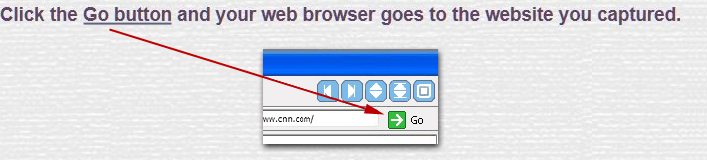
At the top of
the viewer is the URL address that the webpage was captured from.
One click and your browser
will go to that page. No need to search for the webpage again or type in a long URL. The image becomes a
bookmark. How cool is that?.
But
here’s the coolest thing yet…
PageGulp costs almost nothing. And the PageGulp Viewer is free (it can quickly be downloaded by anyone).
Because PageGulps are actually standard JPEG images, they can be viewed without the PageGulp viewer.
This makes sharing them easy, and the recipient does not need to download anything.
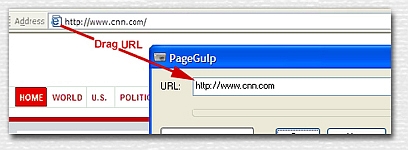
The PageGulp webpage capturer takes an internet address and then saves the contents of the webpage as
a JPEG image file. No need to type in the web address, just drag it from your web browser's address bar.
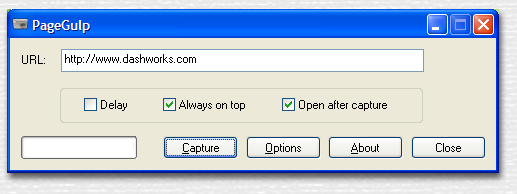
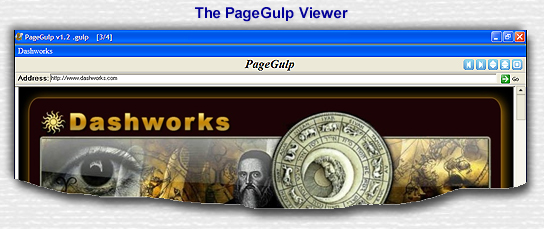
The PageGulp Viewer, shown below, is included with PageGulp. Here it's captured our own webpage.
Notice the Address bar at top. It's captured the URL and the webpage title, ready to return you to the
actual website with a single click. The navigation buttons are great for viewing long webpages.
Grab your copy of PageGulp today! We're sure you'll find PageGulp a very useful
tool.


14-day free trial
And a very
low purchase price after
that...Just $3.95
Give it a try. Then buy your very own copy for less than four dollars
by clicking on the button below.